
High Dynamic Range with Stereoscopic Depth Cameras#
Overview#
The FRAMOS Industrial Depth Camera D400e Series – High Dynamic Range application note provides general instructions on how to use High-Dynamic-Range (HDR) function on FRAMOS D400e camera series.
Note
All the information given in this application note is valid for FRAMOS D400e camera series firmware version v1.15.0.0 (or higher) for D435e, v1.10.0.0 (or higher) for D415e, and v1.5.0.0 (or higher) for D455e. The required D400e software package version is v2.8.0 (or higher).
Note
The HDR function is only available for depth stream.
Functional Description#
By default, FRAMOS D400e camera series uses a single image pair taken with a single exposure to calculate and show a depth image. Although this works for most scenes, scenes that have a big difference between the darkest and lightest parts of it will lead to part of the depth image having invalid depth. In such cases, HDR might help in creating a depth image with more valid pixels.
Software Configuration#
For a camera to work in HDR mode, it needs to be properly configured. The first thing that is needed is to enable metadata. A new “Metadata Toggle” button was added in Intel RealSense Viewer under the “Controls” of “Stereo Module”. Please ensure that the camera is not streaming while toggling metadata. Figure 1 shows the location of “Metadata Toggle” button.

Figure 1 – Metadata Toggle button#
The following parameters are also connected to HDR: “HDR Enabled”, “Sequence Name”, “Sequence Size” and “Sequence Id”. These are also located under the “Controls” of the “Stereo Module”. Figure 2 shows the location of these parameters.
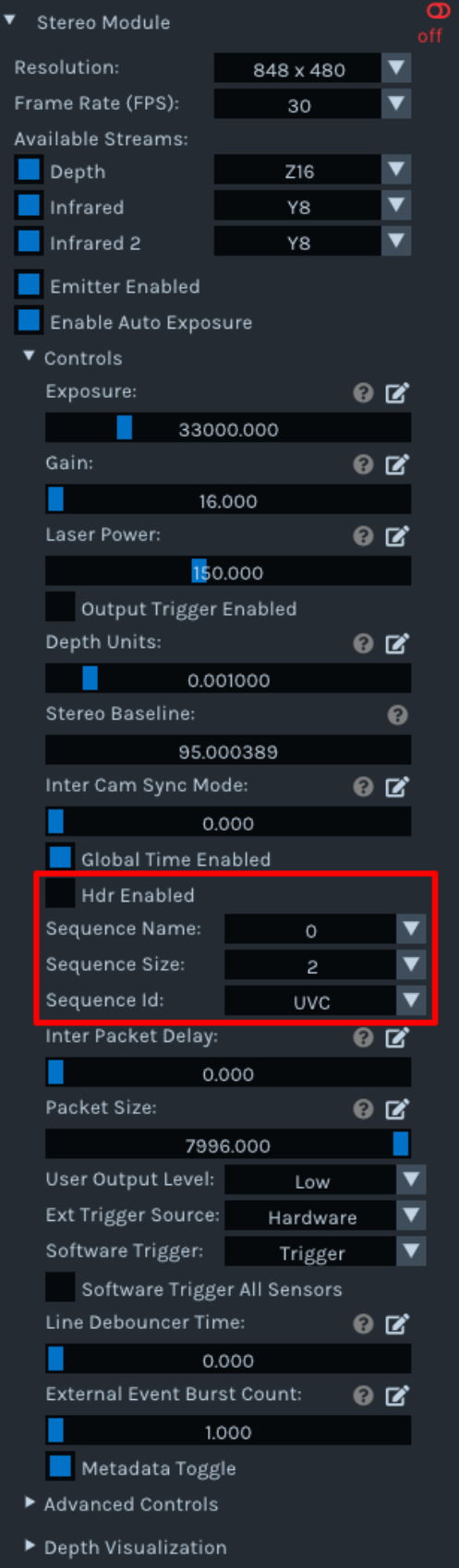
Figure 2 – Sequence and HDR Enabled parameters#
The final parameter important for HDR is located under “Post-Processing” in “Stereo Module”. The parameter that is important is “HDR Merge”.
Instead of viewing each of the two images taken with different exposures, while “HDR Merge” is enabled, the images will be combined and only the combined depth image will be shown. Figure 3 shows the location of this parameter.
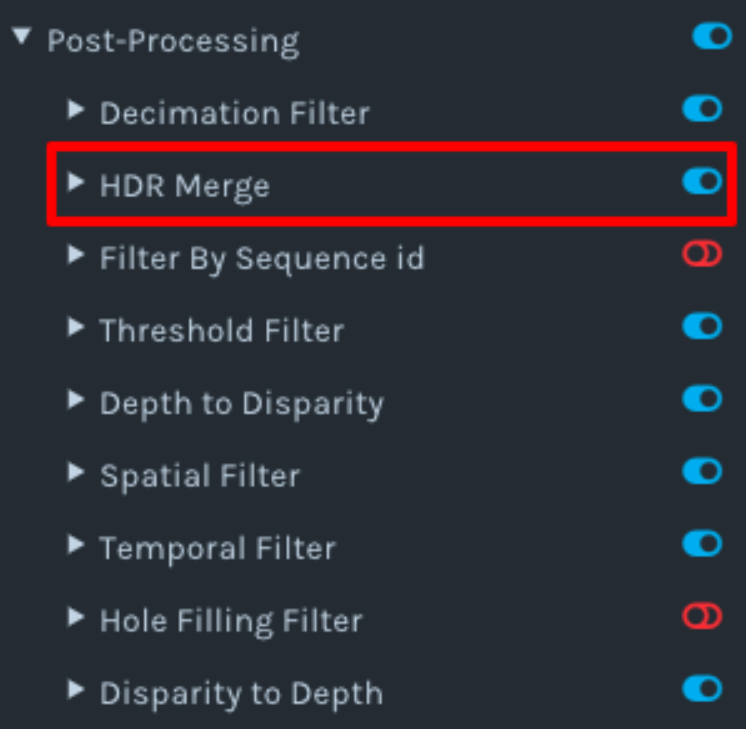
Figure 3 – HDR Merge button#
Note
For an example on how to setup HDR through code, please check the “rs-hdr” example.
Note
For additional information on HDR and how to setup everything correctly, please refer to Intel’s “High-Dynamic Range with Stereoscopic Depth Cameras” [Ref-1] white-paper.
Known Issues#
As the feature is still in the early stages, there are a few known issues.
feature not working properly on ROS 2 Humble Hawksbill
feature not working properly when camera is in trigger mode
References#
Revision History#
Date |
Version |
Changes |
|---|---|---|
2020-07-28 |
1.0.0 |
Initial release |
2020-07-28 |
1.0.1 |
Added Known Issues chapter |
Table 1 – Revision History